

All of the quizzes on QuestionQuiz.com come with a handy, and free, printable PDF.
This is perfect if you want to use one of our quizzes to challenge your friends, print copies for use in the classroom (we have lots of kid friendly quizzes!) or as a round at a charity quiz night, for example.
The way our quizzes are packaged may vary. Sometimes you’ll get a separate PDF for each round or section, while other times the entire quiz will be included in a single PDF file.
Always check the file contents before printing so you only print what you need.
Before printing your quiz, here are a few things you need to know.
Printing & Usage Notes
-
Non-commercial use only: Our quizzes are provided free for personal, educational, or recreational use. If you’d like to use them for commercial purposes, please contact us at hello@questionquiz.com.
-
Black & white by default: Most of our quizzes are designed in black and white to make printing and photocopying as cost-effective as possible. If you’d like one of our Dingbats or kids quizzes with a splash of colour, just let us know.
-
Print quality: The final look will depend on your printer, ink, and paper quality. For the best results, use standard A4 or Letter size paper.
-
Environmentally friendly: Please consider the environment and only print what you truly need. You may also wish to share the quizzes digitally to reduce paper use.
-
Accessibility: If you need a larger print version or a more accessible format, get in touch and we’ll be happy to help.
- Reusable design: Our Dingbats quizzes don’t always include spaces for answers on the page. This makes them reusable, easy to share between a group (each person can write answers on their own sheet of paper), or answers can simply be written on the back of the page.
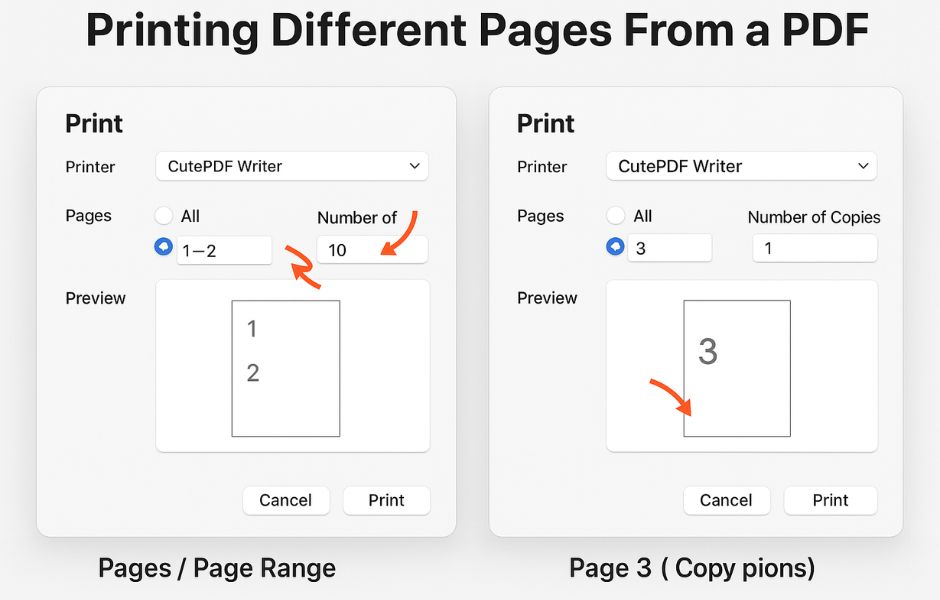
Printing Different Pages From a PDF
Sometimes you may want to print certain pages more than others. For example, you might want 10 copies of the Dingbats quiz page but only 1 copy of the answer sheet.
Here are two easy ways to do that:
Option 1: Print in Separate Steps
-
Open the PDF and go to Print.
-
In the Pages box, type the page numbers you want (e.g.
1-2). -
Enter the number of copies (e.g.
10) and print. -
Repeat the steps for other pages (e.g. page
3, 1 copy).
Option 2: Custom Page List (One Print Job)
-
Open Print.
-
In the Pages box, type the sequence of pages in the order and quantity you want. For example:
(This will give you page 1 ten times, then page 3 once.)
-
Set Copies to
1and print.
Tip: Page numbers may vary depending on your PDF reader (sometimes they start at the cover page). Always double-check your preview before printing.
Printing Tips
Finally, here are few last things you might want to consider before printing your quiz:
-
Double-sided printing: If your printer supports it, choose duplex (double-sided) printing to save paper.
-
Scaling / Fit to Page : Check your print settings (e.g. “Fit to Page” or “Actual Size”) to make sure nothing is cut off.
-
Paper size: Our quizzes are designed for A4 or Letter paper. Make sure your printer is set to the correct size.
-
Digital option: You can also use the PDF on a screen (phone, tablet, laptop) instead of printing.
-
Test page: Print a single page first to check layout and scaling before running multiple copies.
-
Answer sheet: Remember, you don’t need to print the answer sheet unless you want it.
Printing FAQs
Can I print from my mobile or tablet?
Yes. Most modern devices let you print directly to a Wi-Fi enabled printer using apps like AirPrint (Apple) or Google Cloud Print / manufacturer apps (Android). If you don’t see your printer, you may need to transfer the file to a computer first.
Do I have to print in colour?
No. All our quizzes are designed in black and white to save ink and photocopying costs. If you’d like a splash of colour on a Dingbats quiz, just let us know.
Can I print double-sided?
Yes, if your printer supports duplex printing. This is a great way to save paper.
What paper size should I use?
Our quizzes are designed for A4 or Letter size paper. Just check your printer settings match your local paper size.
Do I need to print the answer sheet?
Not necessarily, you can view the answers on-screen or print just the pages you need.
Can I reuse the quiz sheets?
Yes. Dingbats quizzes don’t have answer boxes, so you can reuse them or share one copy with a group. Participants can write their answers on separate sheets or the back of the page.
If you’d like them to last even longer, you can laminate the sheets and use dry-wipe markers, perfect for classrooms, other or repeated use.
If you have any further questions please don’t hesitate to get in touch – hello@questionquiz.com or take a look at our Frequently Asked Questions.